
Secure AI Agents, Right Inside Claude

Vikram Thakur
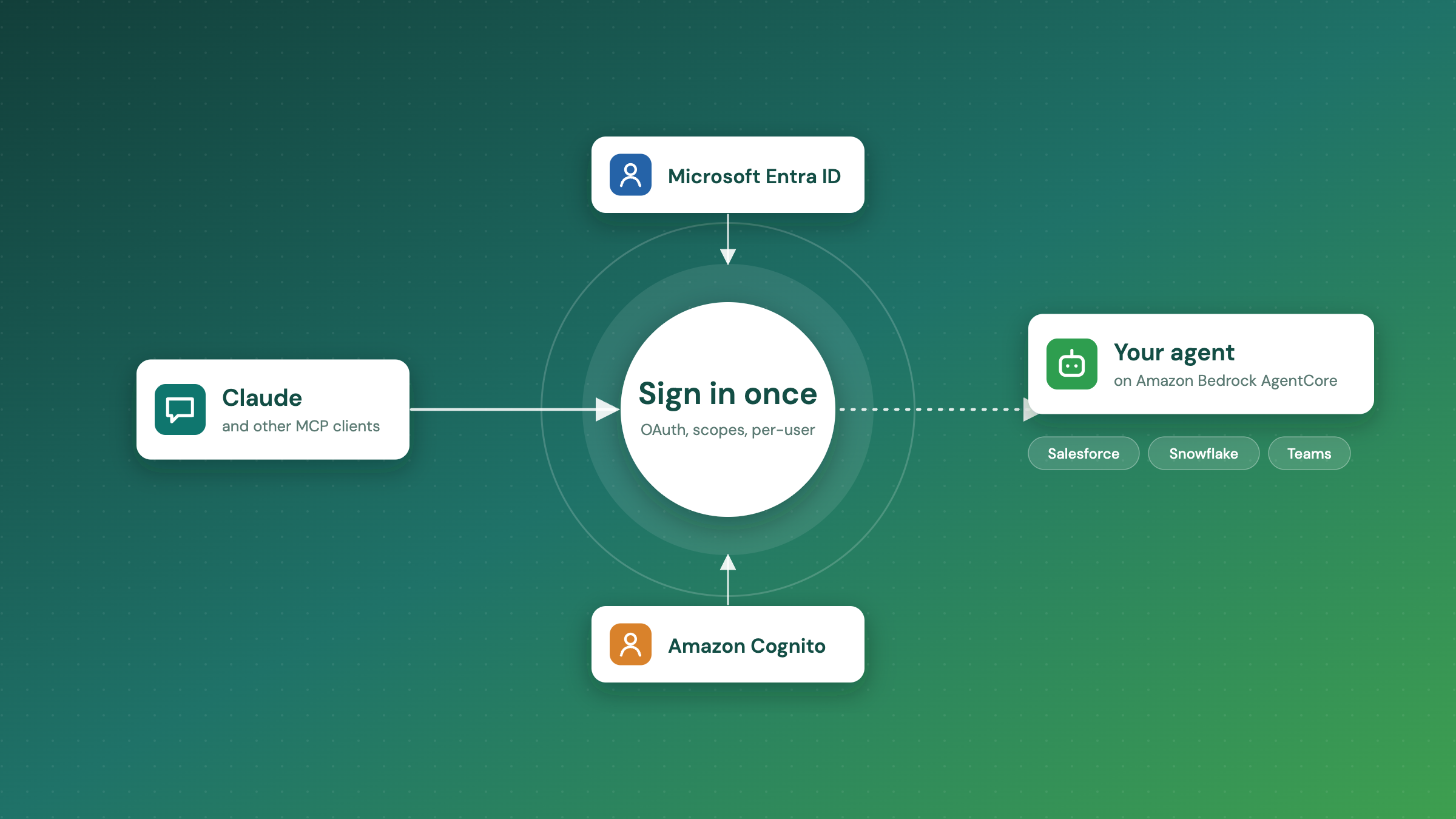
In almost every client conversation we have had this year, Claude is already in the room. Developers use it to vibe code and build internal tools. Analysts use it to work through data. Everyone else uses it for the day-to-day: drafting, summarising, planning. It has become the place where work starts.
So the next question is always the same: can it work with our own systems? Not a copy of the data pasted into a chat, but the real Salesforce org, the real data warehouse, with the same permissions people already have.
Our answer is to bring the agents to where people already work. Instead of building another portal that someone has to log into, we build agents on whichever cloud the client already runs, AWS or Azure, and expose them as MCP apps. Anyone in the company adds one URL to Claude, signs in with their normal work account, and the agent's tools appear. Because it is plain MCP, the same agent also works in any other desktop client that can connect to remote MCP servers.
This post walks through two of the agents we are building this way, and then the part that matters most for an enterprise: how we handle security.
What we build: agents as MCP apps
The agent can run on Amazon Bedrock AgentCore or on Azure, depending on where the client's workloads already live, and it owns its own tools and logic. In front of it sits a thin MCP layer that Claude talks to. In this post we use AgentCore as the example. From the user's side it looks like this:
- add the agent's URL in Claude as a custom connector,
- sign in once with the company identity provider, with MFA and all the usual policies,
- ask questions in plain language, and Claude calls the agent's tools when it needs them.
No client IDs, no secrets, no extra app to install. The agent never sees a password, and Claude never sees the systems behind the agent.
Use case 1: the Salesforce order desk
In an earlier post we described an agent that runs in production for a client: a customer attaches a purchase order to a Salesforce case as a PDF, an Excel file or a link, and the agent reads it, places the order and closes the case with the order number. That automation runs on its own, every day.
Once that agent exists, the obvious next step is to let people ask it things. Exposed as an MCP app, sales and support can ask Claude questions like:
- What's the status of the order from Acme's PO last week?
- Which cases are still waiting on a purchase order?
- Did yesterday's run place everything, or did anything need a human?
They get answers without opening Salesforce or digging through case history, and the agent only reads what their role allows.
Use case 2: a finance agent with live dashboards
The second agent we are building sits on top of the client's data mart in Snowflake. The finance team asks in plain language: revenue by region this quarter against last, margin by product line, overdue invoices by customer. The agent turns each question into a query, runs it through a read-only role, and returns the results. Claude then draws them as charts and dashboards right in the conversation.
The useful part is iteration. Someone looks at the chart and says "only enterprise accounts" or "break that out by month", and the agent rewrites the query and runs it again. Nobody files a BI request and waits a week, and nobody gets direct access to the warehouse.
The hard part: security
Opening business systems to a chat client raises fair questions. Who exactly is calling the agent? What can they reach? Can we prove later who asked for what? An agent that answers anyone who finds the URL is not something any client should run, so the design starts from identity.
Why connecting Claude straight to Entra ID doesn't work
Most of our clients sign in with Microsoft Entra ID, so the first thing we tried was the obvious one: point Claude's custom connector at an MCP server protected by Entra. It doesn't work today, and we are not the only ones who found that. Several public issues on Anthropic's MCP tracker describe the same failure: the user signs in to Microsoft successfully, and then the connection never completes.
There are three reasons it breaks:
- Entra ID does not support dynamic client registration, which Claude uses for its one-click connect, so the direct path falls back to manual client IDs and secrets.
- The resource value Claude sends during sign-in does not match what Entra expects for the app registration.
- Even after a successful sign-in, the code exchange that should hand Claude a token never finishes.
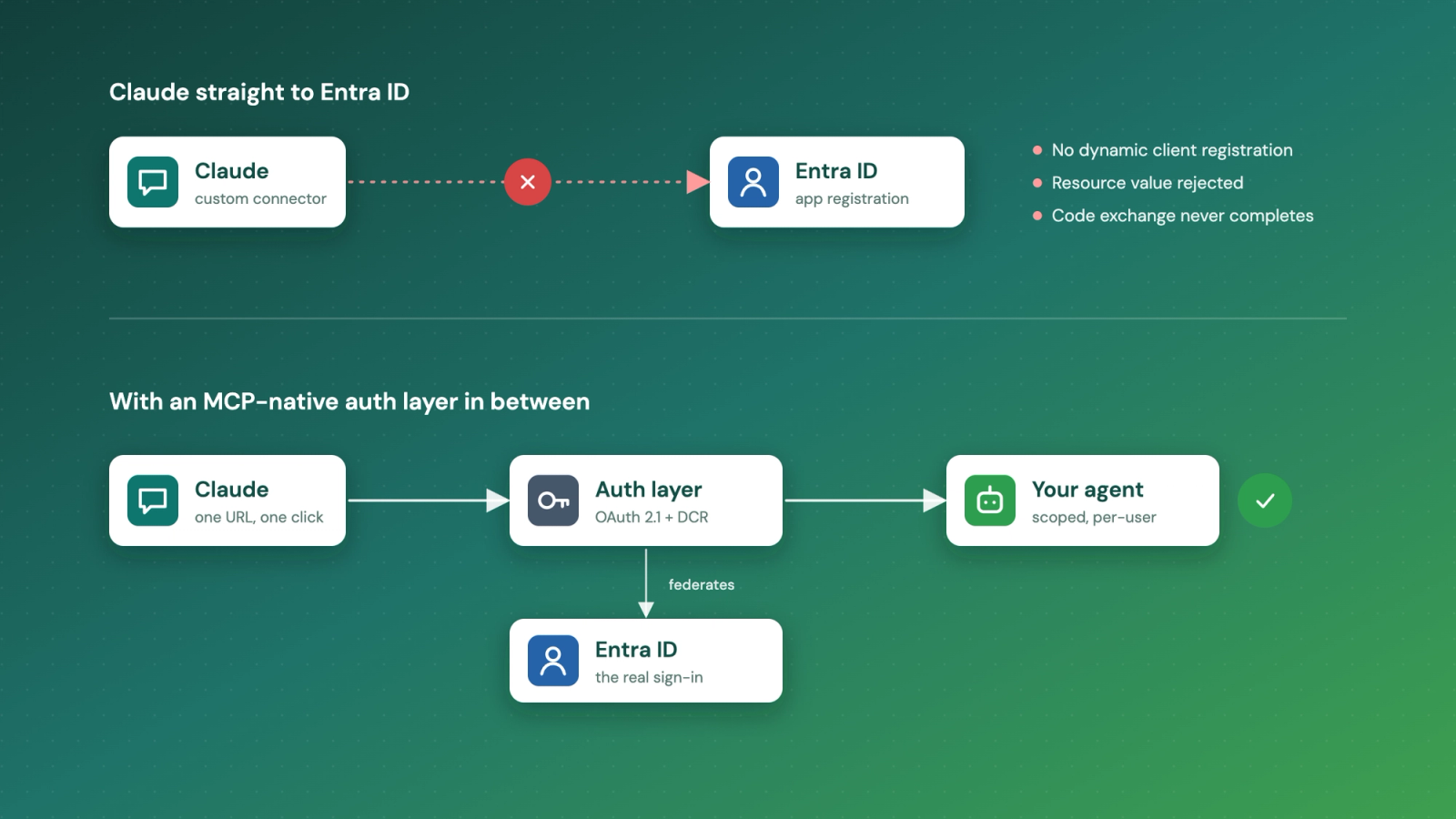
The fix is to stop asking Claude to talk to Entra at all. We put an MCP-native authorization layer in the middle. Claude speaks the OAuth flow it expects to that layer, and the layer hands the actual sign-in to Entra. Users still see their normal Microsoft login, MFA still applies, and only people assigned to the app get through.
Two identity paths, one agent
Clients sign in in different places, so we built two paths that end at the same agent.
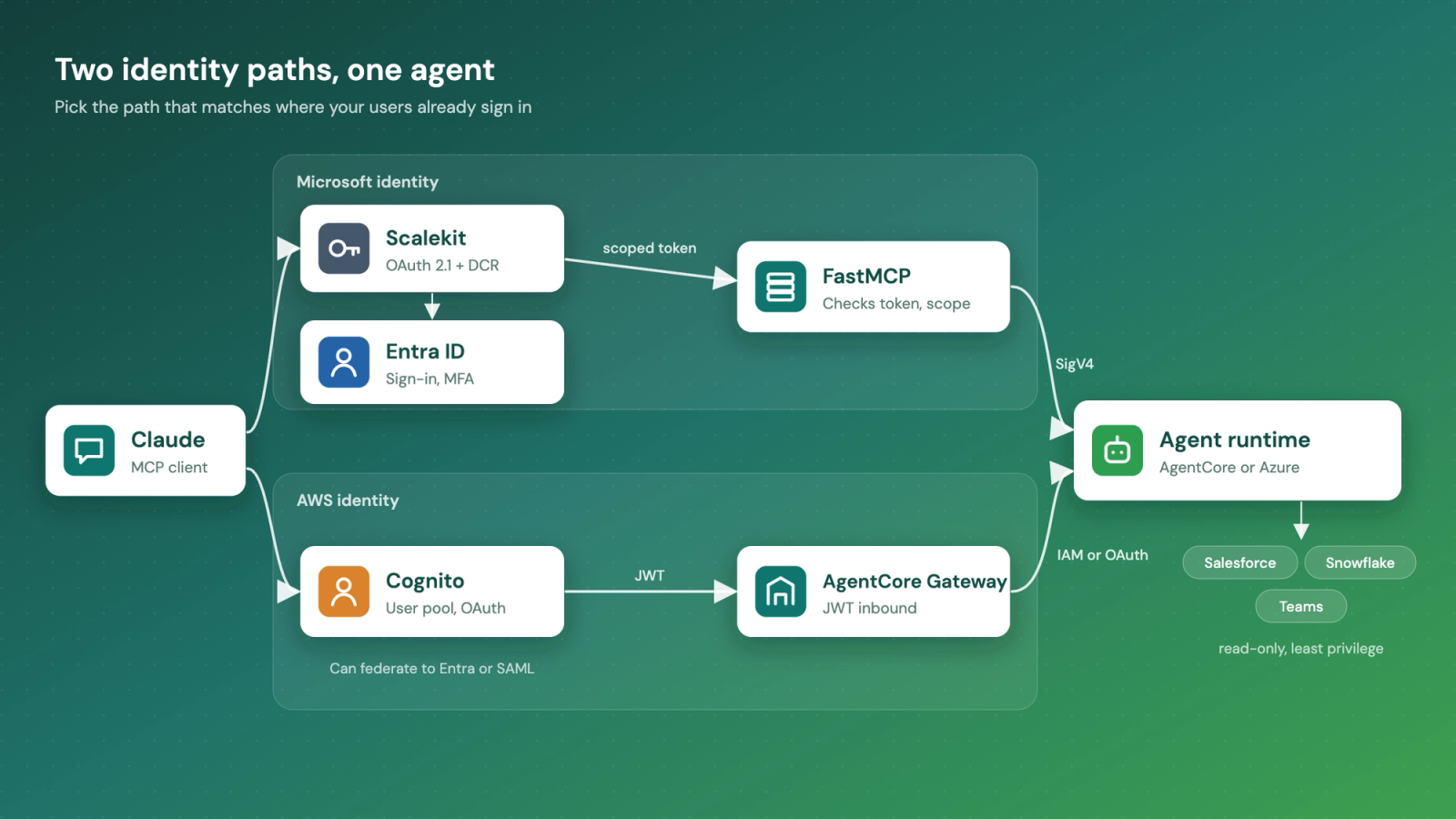
Microsoft identity: Scalekit, Entra ID and FastMCP
Scalekit acts as the authorization server. It supports dynamic client registration, so connecting really is one click, and it federates the login to the client's Entra tenant. It issues its own short-lived, scoped token and never touches agent traffic.
A small FastMCP server is what Claude actually connects to. It checks every token's issuer, audience and scope, enforces which tools each scope allows, and derives a stable session per user. It then calls the agent runtime over IAM with SigV4, and the runtime is configured to trust only that one role.
AWS identity: Cognito and AgentCore Gateway
For clients who live in AWS, Amazon Cognito is the identity provider and AgentCore Gateway is the MCP endpoint. The Gateway validates the JWT from Cognito on the way in, then reaches the agent and its tools with IAM or OAuth on the way out. Cognito can itself federate to Entra or any SAML provider, so this path also works for companies that keep their users in Microsoft but their workloads in AWS.
We have built the same agent both ways. The choice comes down to where your users already sign in and which cloud your team prefers to run.
The pattern is not tied to AWS. On Azure, the agent runs in Azure AI Foundry or Azure Container Apps, the MCP layer sits behind Azure API Management, and Entra ID stays the identity source. Only the hosting changes; the five checks below stay the same.
Five checks between a prompt and your data
Whichever path a client picks, every request passes the same five checks. Each one answers a single question, so no one setting carries all the risk.
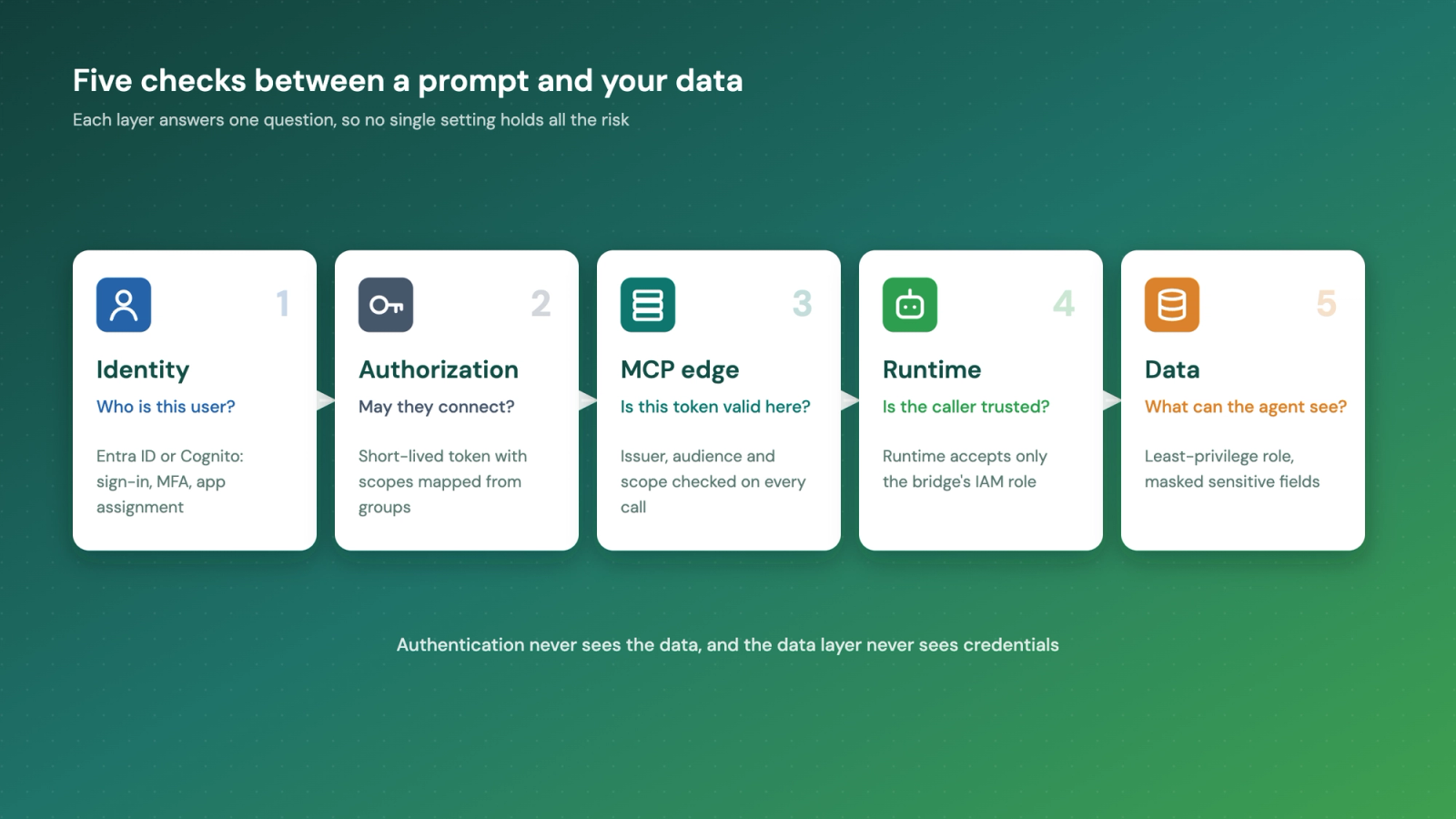
- Identity: who is this user? Entra ID or Cognito handles sign-in, MFA and app assignment.
- Authorization: may they connect, and to which tools? Scopes come from roles mapped to identity groups, so granting or revoking access needs no code change.
- MCP edge: is this token valid here? Issuer, audience and scope are checked on every call, not just at sign-in.
- Runtime: is the caller trusted? The agent runtime accepts calls only from the bridge's IAM role.
- Data: what can the agent see? Each agent uses a least-privilege, read-only role, with sensitive fields masked at the source. The finance agent's Snowflake role is a good example.
Two things fall out of this design. Each user gets their own isolated session, with memory kept per user through AgentCore Memory. And every tool call is logged with the caller's verified identity, which is the evidence trail clients need for PCI DSS and HIPAA work.
Lessons learned
- Decide on inbound auth before you create an AgentCore Gateway. The inbound auth type cannot be changed afterwards, so switching means creating a new gateway.
- A runtime accepts either SigV4 or JWT inbound, not both. Picking SigV4 and letting one trusted bridge call it keeps the runtime's attack surface small.
- Verify your email domain in the authorization layer. Until we did, sign-ins fell back to one-time codes instead of routing to Entra.
- A tunnel is fine for proving the flow end to end, but run the MCP layer on managed hosting such as App Runner or ECS Fargate for anything real.
Meet your team where they already work
If your people already use Claude every day, your agents can meet them there, with the same login, the same permissions and a full audit trail. We use the same pattern for order desks, finance reporting and escalations, on AWS or Azure, and it works with whichever MCP client your team prefers.
If you want to try this with your own systems, get in touch. We will share our access checklist so you know exactly what's needed before we start.